
Cold email deliverability is controlled through 3 steps: configuring SPF/DKIM records and warm-up sequences, crafting spam-filter-friendly emails with personalization, and maintaining clean contact lists through segmentation. B2B has the highest bounce rate of any sector at 75% — teams that master these three steps reduce bounces below 2% and protect domain reputation at scale.
Last Refreshed: March 2026 with updated statistics and tool information.
Cold email deliverability is the ability of your outbound emails to reach recipients’ inboxes rather than bouncing or landing in spam — controlled through proper account configuration (SPF/DKIM), spam-aware copywriting, and regular contact list hygiene.
From Daniel Conn, GTM Strategist, graph8: “The biggest deliverability killer isn’t your subject line — it’s the quality of the list behind it. A 2% bounce rate on a clean, verified list outperforms a 20% open rate on a bloated one. Get the technical infrastructure right first, then optimize copy.”
Every outbound sender’s worst nightmare: you finalize the campaign, hit send, and discover a wall of bounced emails. The addresses were valid — or so you thought. What went wrong?
Cold email deliverability isn’t just about content — it’s infrastructure. Miss a single technical requirement and your message never reaches the inbox, no matter how good the copy. The three levers that control it are account configuration, email copywriting, and contact list hygiene.
Use these proven steps to ensure your emails land in the recipient’s inbox, where they can read, reply, and convert into qualified prospects.
What Makes an Email Bounce?
Email bounce, soft and hard, occurs when cold emails do not reach their destination. The impact of a high email bounce rate goes beyond a single campaign. It can negatively reflect the overall email deliverability and lower your domain reputation. Let’s check out the differences and why some emails don’t meet their destination.
What is a soft bounce?
A soft bounce means that your message was rejected by the recipient’s email server due to some temporary issue. For example:
- The inbox was overloaded.
- The size of the email was too big.
- The server was down for a short while.
A few soft bounces or so are perfectly okay, even from a list of completely verified emails. It happens.
What is a hard bounce?
A hard bounce, on the other hand, happens when you send an email either to a blocked email address or to one that doesn’t exist. That’s a permanent issue. It won’t get delivered no matter how hard you try. A hard bounce may be caused by:
- Out-of-date contact lists. This happens when you send an email to a blocked email address or to one that doesn’t exist.
- A purchased list of contacts. These lists often include inactive email addresses and recipients that are not interested in your service.
- Free email domains. Using a free email domain, as opposed to a private business domain, can block your authentication and send your email directly to spam.
And when these rates are disturbingly high, a sender can get blacklisted. Once that happens, none of the emails will get delivered to anyone.
The B2B industry is highly susceptible to high bounce rates. Research by ContentSquare’s Digital Experience Benchmark shows B2B leads all sectors with the highest bounce rate at 75% — nearly double the next closest industry. CIENCE works with 2,500+ clients across 250+ industries, rated 4.6/5 on Capterra — and email deliverability is consistently one of the first issues we help teams fix before scaling outbound.
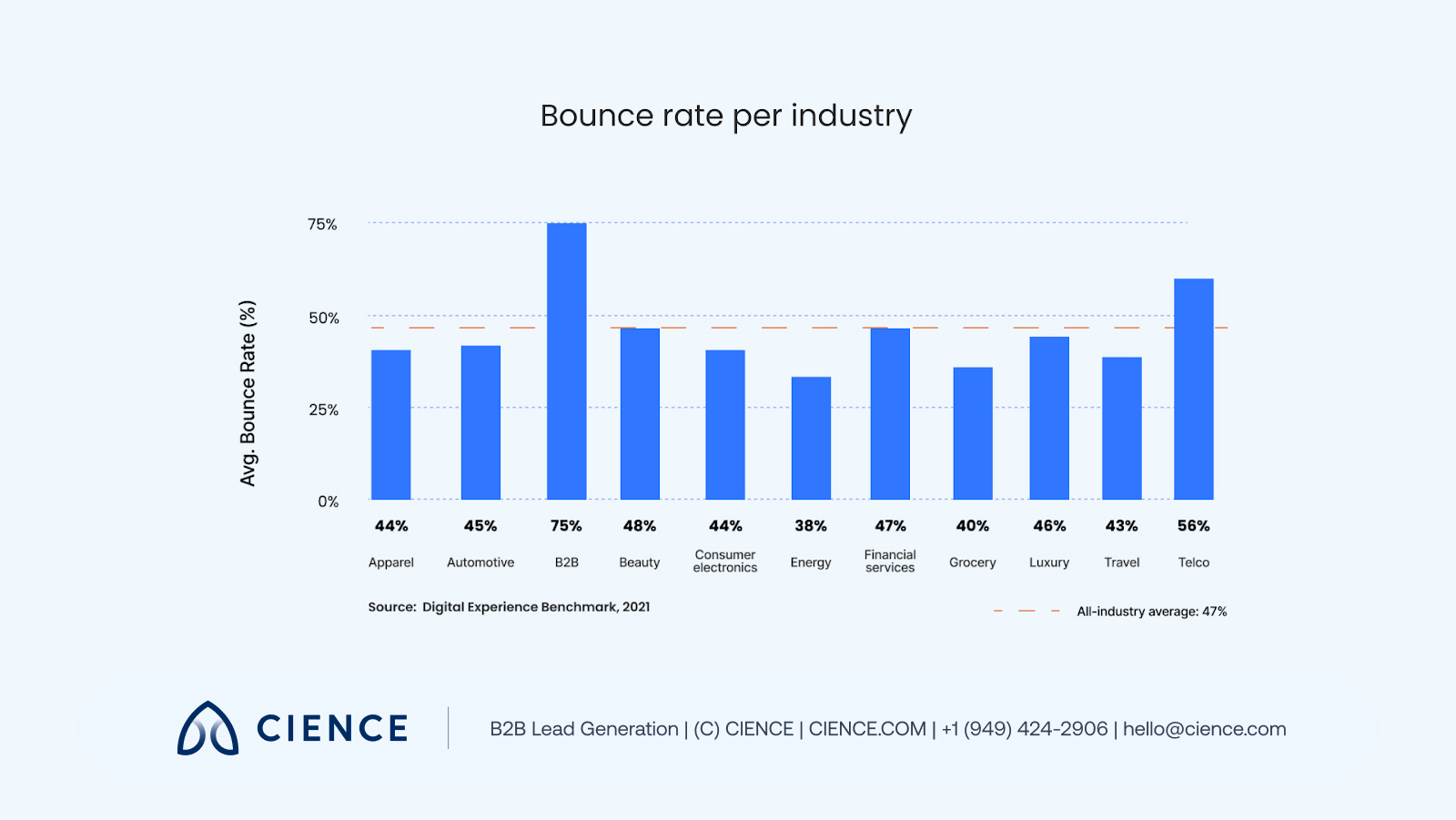
As a rule of thumb, the lower your bounce rates are—the better. So how do you reduce the chances of your emails coming back? Start with these necessary steps to control email deliverability.
How to Improve Email Deliverability
It’s crucially important for every B2B business to craft a successful cold email campaign. In terms of outbound sales, B2B marketers identify emailing as the leading channel for producing leads, with the highest ROI.
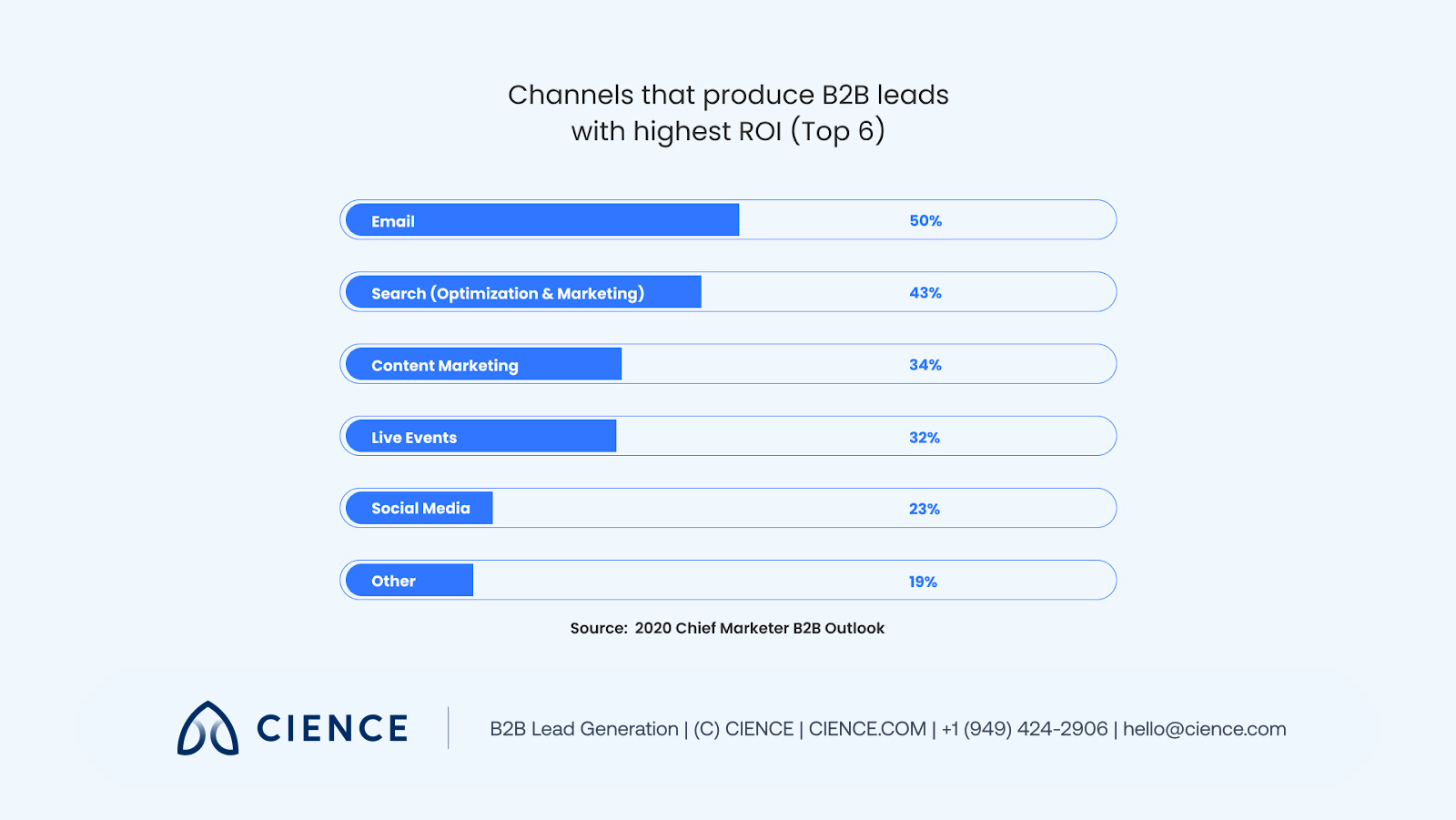
To improve email deliverability and exceed those ROIs, use these steps to configure your account, craft emails, and build your contact lists:
Step 1. Configure your email account.
Undeniably, regardless of if you use email marketing software, Gmail, or another app the way we set up our email account has a bearing on email reputation. If you don’t take care of your email account, your emails simply won’t reach their destination. Here’s how to configure your account:
1. Set up a separate email account.
You’ll want to have full control over the number of emails that come out of the email address that you use for outbound. When running a busy marketing campaign, it’s easy to miss those numbers. Plus, it’s unlikely you can predict the exact number of emails you’ll send tomorrow.
But when it comes to email outreach, you need to control those numbers. You don’t want to send out tons of emails and get blocked.
Also, take into consideration A/B testing. You shouldn’t compromise your business email address reputation when conducting outreach tests. Set up a separate account to foolproof this.
2. Set SPF and DKIM records.
It’s highly recommended to set up authentication in your email marketing service. The Sender Policy Framework (SPF) and Domain Keys Identified Mail (DKIM) can prevent anyone from using your email address to send emails on your behalf.
The SPF defines which IPs can be used to send emails from your domain; the DKIM indicates ownership of the email message by a particular organization.
Setting up both SPF flattening and DKIM will reduce spam and improve email deliverability rates. If you need a hand setting them up, contact your email provider — most have step-by-step guides.
3. Warm up a new email account.
Prepare your email account for sending out emails. You can do that by sending a few emails to your friends or colleagues and gradually increasing their volume. Ideally, you should gather a few responses and then reply back. After that, check your email reputation using tools like Mail Tester.
You shouldn’t send that many emails out without giving your email address a proper warm-up because it’s a spammer’s move: setting up new email accounts, sending bulk emails, and then moving on to another account—this doesn’t look good.
Step 2: Carefully craft your email.
Before your recipient opens your email, you’ll need to compose your email to make your product and services appealing. The words you use and how you use them may determine the fate of the cold email. Use these tips when writing your emails:
1. Avoid spammy words.
To increase the overall deliverability of your emails, concentrate on your language. Spammy words like “exclusive” or “fantastic” can alarm spam filters and lead them to believe you’re a spammer. The more you use them in your copy, the higher the chance you’ll get into trouble.
And if spam filters don’t stop your messages from being delivered, angry prospects may manually mark your emails as spam when they don’t like the content.
2. Personalize your emails.
Most SDRs use a template for email outreach with room for personalization — and there’s nothing wrong with that. Personalization is table stakes: Salesforce research shows 80% of buyers prefer companies that tailor their outreach, and relevance is the single biggest driver of reply rates in cold outbound. Reference the prospect’s industry, role, or a recent trigger event — not just their first name.
See how top cold email subject lines balance personalization with curiosity to maximize open rates. For ready-to-use frameworks, see our cold email templates library.
3. Use plain-text formatting.
Simple, text-based emails look more natural to spam filters and to recipients. Avoid excessive graphics, colors, and HTML embellishments that signal bulk sending. A plain-text structure also renders cleanly across every email client — reducing formatting surprises that hurt response rates.
4. Avoid excessive GIFs and fonts.
Keep the form of your email and email signature as simple as possible. Emails that contain only text look more natural to spam filters. If you use a lot of images, gifs, and colorful fonts, it raises suspicion and may lower your chances of email deliverability.
Step 3: Update your contact list regularly.
From Quincy Berg, SDR Operations Lead, CIENCE: “List hygiene is the unsexy discipline that separates teams with consistent deliverability from those who wonder why their open rates keep dropping. We clean and re-verify contact lists every 30 days on active campaigns — it’s non-negotiable.”
To have control over your cold email deliverability and hold your bounce rate at the low bar, you’ll need to build a trustworthy prospect base. To do so, remove uninterested parties from your email lists and update your lists regularly:
1. Focus on segmentation.
Email address lists need to be regularly updated and cleaned from inactive, unresponsive, and fake subscribers. Those subscribers might have stopped opening your emails for a long time for a variety of reasons or blocked spam emails completely. You can find many segmentation tools online that will help you segment inactive and active subscribers. You can also set different filters, identifying addresses that did not respond to your campaign for a while, and unsubscribe them.
If your outbound is producing diminishing returns despite more tools and more reps, the problem isn’t execution — it’s architecture.
2. Seek verification.
When you struggle to find a specific person’s email address you need to reach, you may feel tempted to direct your message to [email protected] or [email protected]. But the chances that your email gets read are rather slim. Instead, spend more time researching to find specific people to add to your contact list. Use email list providers and verification tools to confirm addresses before they enter your sequences.
“Thanks to CIENCE, we’ve seen a 500% monthly increase in new sales appointments.” — Bryce Garoutte, Sr. VP of Business Dev & Marketing, Silicon Valley Insight
CIENCE + graph8 pricing: $5,000 one-time GTM system setup, $2,499/mo strategic execution, and the graph8 platform at $499/mo. No long-term contracts. See full pricing →
Whether or not you decide to work with us, you’ll walk away with a clear picture of where your pipeline is leaking and what it would take to fix it.
Frequently Asked Questions
What is a good cold email bounce rate?
A good cold email bounce rate is below 2%. Anything above 5% is a red flag that signals list quality issues, and rates above 10% risk getting your domain blacklisted. B2B industries average the highest bounce rate at 75% across all email types, making regular list cleaning and email verification essential for outbound campaigns.
What are SPF and DKIM records, and why do they matter?
SPF (Sender Policy Framework) defines which IP addresses are authorized to send emails from your domain, while DKIM (DomainKeys Identified Mail) adds a digital signature proving email ownership. Both are authentication protocols that tell receiving servers your emails are legitimate, significantly improving inbox placement and reducing spam filtering.
How long should you warm up a new email account?
Warm up a new email account for 2-4 weeks before launching outbound campaigns. Start by sending 5-10 emails per day to known contacts, gradually increasing volume by 10-20% daily. Aim to generate replies and engage in natural conversations. Tools like Mail Tester can verify your email reputation score before you begin cold outreach.
“CIENCE’s targeted outreach delivered a 12% reply rate and more than doubled our monthly meetings booked — better results than we were getting from our internal team.” — Imagecraft
Keep your bounce rate below 2%, your domain reputation clean, and your sequences running on verified data — and your outbound will consistently outperform teams that skip the infrastructure. For a deeper dive, see our guide to email automation tools that support compliant, high-deliverability outbound at scale.
Editor’s note: This post was originally published in July 2018 and has been completely updated for accuracy and comprehensiveness.

A graph8 company — AI-powered GTM execution across 250+ B2B industries.
graph8 Platform
From $499/mo
Run your own GTM campaigns with AI-powered data, sequences, and analytics.
Start Free — 2,500 Credits No credit card requiredCIENCE Managed
From $2,499/mo
Our GTM teams build and run your outbound campaigns end-to-end.
15-min call · No commitment2,500+ B2B companies served · Month-to-month contracts · See full pricing →